How to Create a GST Invoice: Step-by-Step Guide

Samaun Kabir
Editor
Creating a GST invoice correctly is an important part of running a GST-registered business in India. A proper invoice records the supply, identifies the supplier and recipient, shows the taxable value and applicable GST, and provides the information needed for accounting and tax reporting.
So, how to create a GST invoice?
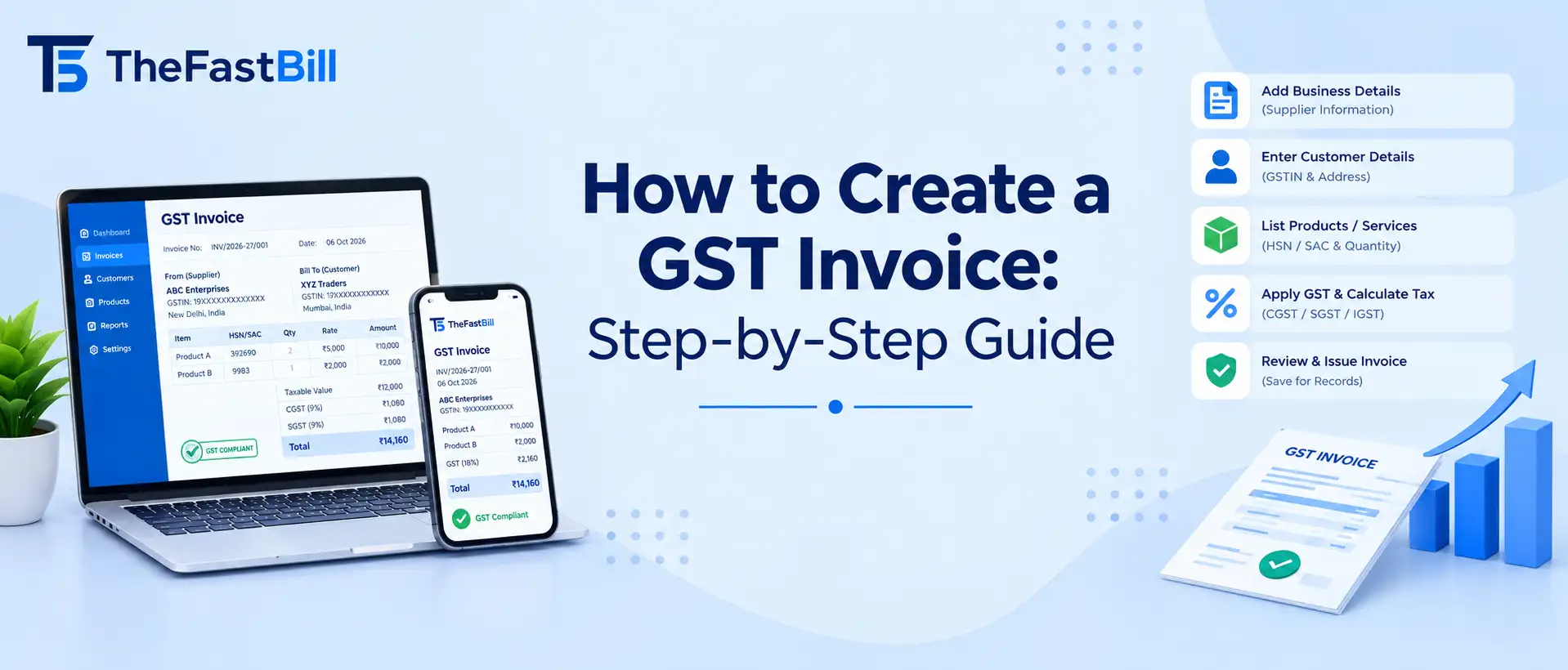
Start by entering the supplier's details and GSTIN, the invoice number and date, recipient information, description of the goods or services, HSN or SAC details, taxable value, applicable GST, and other required particulars. Then review the tax calculation and issue the invoice according to the applicable GST rules.
However, a GST tax invoice should not be confused with GST e-invoicing. E-invoicing is a separate system that applies to taxpayers covered by the government notification and applicable turnover criteria. The GST tax-invoice rules themselves apply more broadly to registered persons making taxable supplies.
What Is a GST Invoice?
A GST invoice is a document issued for a taxable supply by a registered person when a tax invoice is required under GST law.
It records important transaction information such as:
Supplier name, address, and GSTIN
Invoice number and date
Recipient details
Description of goods or services
HSN code or SAC, where applicable
Quantity and unit details for goods
Taxable value
Applicable GST rate and tax amount
Place of supply where required
Other prescribed particulars
Under Section 31 of the CGST Act, a registered person supplying taxable goods or services is generally required to issue a tax invoice subject to the applicable provisions and exceptions.
GST Invoice vs GST E-Invoice
These two terms are often confused.
A GST tax invoice is the invoice document issued for a taxable supply in accordance with GST requirements.
A GST e-invoice, on the other hand, refers to the electronic invoicing system under which specified taxpayers must report invoice information to the Invoice Registration Portal and obtain the applicable Invoice Reference Number (IRN).
Therefore, not every GST invoice is automatically an e-invoice.
The e-invoicing mandate has been expanded over time and currently covers eligible taxpayers based on applicable aggregate annual turnover and other government-prescribed conditions.
Businesses should check the current applicability rules before assuming that e-invoicing is or is not required.
Who Needs to Issue a GST Tax Invoice?
Generally, a GST-registered person making a taxable supply is required to issue a tax invoice, subject to the applicable GST provisions.
There are important exceptions and alternative documents.
For example:
A composition taxpayer generally issues a bill of supply rather than a tax invoice.
A registered person supplying exempt goods or services generally issues a bill of supply.
A registered person receiving an advance may need to issue a receipt voucher.
Certain reverse-charge transactions have specific invoicing requirements.
Credit notes and debit notes may be required when the taxable value or tax charged needs to be adjusted in accordance with GST law.
This is why businesses should identify the type of transaction before creating the document.
What Information Should a GST Invoice Contain?
Rule 46 of the CGST Rules specifies important particulars for a tax invoice.
1. Supplier Details
Include:
Legal name of the supplier
Business address
GSTIN
Other prescribed details where applicable
2. Unique Invoice Number
The invoice should have a consecutive serial number that is unique for the relevant financial year and follows the applicable invoice-numbering rules.
Avoid creating duplicate invoice numbers or changing an invoice number after issuing the document.
3. Invoice Date
Enter the date on which the invoice is issued.
The invoice date does not necessarily have to be identical to the date of supply. GST law specifies different timing requirements depending on the nature of the supply.
4. Recipient Details
For a registered customer, include the relevant name, address and GSTIN.
For an unregistered customer, the required details depend on the circumstances and applicable GST rules. For example, Rule 46 contains specific requirements for certain taxable supplies to unregistered recipients.
5. Goods or Services
Clearly describe what was supplied.
For goods, include relevant details such as:
Product description
Quantity
Unit
Applicable HSN code
Value
For services, use the applicable description and SAC where required.
6. Taxable Value
Show the value on which GST is calculated after considering applicable discounts or adjustments according to GST valuation rules.
7. GST Details
Clearly show the applicable tax information.
Depending on the transaction, this can include:
CGST
SGST/UTGST
IGST
Applicable cess, where relevant
Do not select a GST rate simply because it is commonly used. The correct rate depends on the goods or services and the applicable classification and notifications.
8. Place of Supply
For transactions where place of supply information is required, enter the correct state and other prescribed details.
Place of supply is important when determining whether a transaction is treated as an intra-State or inter-State supply and therefore whether CGST/SGST or IGST applies.
9. Reverse Charge Information
Where reverse charge applies, the invoice should contain the applicable indication and other required information.
Do not assume that every reverse-charge transaction follows exactly the same invoicing procedure.
10. Signature or Electronic Authentication
The applicable rules contain provisions regarding signatures and electronic invoices. Electronic invoices can have specific authentication treatment, so businesses should follow the method applicable to their invoicing system.
How to Create a GST Invoice Step by Step
Here is a practical workflow you can follow.
Step 1: Confirm Your GST Details
Start with your business information.
Enter:
Business name
Address
GSTIN
State
Contact information, where appropriate
Check your GSTIN carefully before issuing the invoice.
Step 2: Add the Customer Information
Enter the customer's name and address.
If the customer is GST registered, add the customer's GSTIN.
If the customer is unregistered, follow the applicable GST requirements for the particular transaction.
Step 3: Assign a Unique Invoice Number
Create an invoice number that follows a consistent sequence.
For example:
INV/2026-27/001
Your numbering system can be different, provided it complies with the applicable GST requirements.
Step 4: Add the Invoice Date
Enter the date of issue.
Do not automatically assume that the invoice date must always equal the delivery or service date. The correct timing depends on the type of supply and the relevant GST provisions.
Step 5: Add Products or Services
Enter each item separately where appropriate.
For products, include:
Product name
Quantity
Unit price
HSN code
Discount, if applicable
Taxable value
For services, include the service description and applicable SAC details.
Step 6: Enter the Correct GST Rate
Select the GST rate applicable to the specific product or service.
The rate should be verified against the current classification and applicable GST notifications rather than relying solely on software defaults.
Step 7: Confirm CGST, SGST or IGST
The tax type depends on the nature and location of the supply and the applicable place-of-supply rules.
For an intra-State taxable supply, CGST and the applicable State/UT GST may apply.
For an inter-State taxable supply, IGST may apply.
Step 8: Check the Place of Supply
Verify the place of supply before finalizing the invoice, particularly for inter-State transactions.
An incorrect place of supply can result in incorrect tax treatment.
Step 9: Review the Invoice
Before issuing it, check:
GSTIN
Invoice number
Invoice date
Customer information
HSN/SAC
Taxable value
GST rate
Tax amount
Place of supply
Reverse-charge indication, if applicable
Total invoice value
Step 10: Issue and Store the Invoice
Once the information is verified, issue the invoice through your chosen invoicing method.
Keep appropriate records according to the applicable GST record-retention requirements.
If your business falls under mandatory e-invoicing, follow the applicable e-invoice process rather than treating an ordinary PDF invoice as a substitute.
Simple GST Invoice Example
Here is a simplified illustration:
*This is only an illustration using an assumed 18% GST rate. The actual GST rate depends on the product/service classification and current applicable law.
GST Invoice Types You Should Know
GST transactions can involve different documents.
Tax Invoice
A tax invoice is generally used for taxable supplies made by a registered person when a tax invoice is required.
Bill of Supply
A bill of supply is generally used by composition taxpayers and for specified exempt supplies instead of a tax invoice.
Receipt Voucher
A receipt voucher can be relevant when a registered person receives an advance payment for a supply.
Credit Note
A credit note may be issued in situations permitted under GST law, such as when the taxable value or tax charged in the original invoice needs to be reduced.
Debit Note
A debit note may be issued where the taxable value or tax charged in the original invoice needs to be increased, subject to the applicable GST provisions.
E-Invoice
An e-invoice is part of the government-mandated electronic invoicing system applicable to specified taxpayers.
These documents should not be treated as interchangeable. The appropriate document depends on the underlying transaction.
When Should a GST Invoice Be Issued?
The timing depends on whether you are supplying goods or services and the type of transaction.
For Goods
For a taxable supply of goods, Section 31 generally requires the tax invoice to be issued before or at the time of removal of goods when the supply involves movement of goods, or before/at delivery or making the goods available in other situations, subject to the applicable provisions.
For Services
For taxable services, the applicable rules generally require the invoice to be issued within 30 days from the date of supply of service.
Certain specified suppliers, including insurers, banking companies and financial institutions/NBFCs, have a 45-day period under the applicable rule.
Continuous Supply
Continuous supplies of goods or services have additional timing rules. The invoice date can depend on statements of account, payment dates, contractual due dates or completion of specified events.
Therefore, businesses should not use a single “invoice date must equal supply date” rule for every transaction.
When Can an Individual Invoice Be Skipped?
GST law contains specific situations where a registered person may not need to issue an individual tax invoice.
One important example involves qualifying supplies below ₹200 to an unregistered recipient who does not require an invoice. Subject to the applicable conditions, a consolidated tax invoice can be issued for those supplies at the end of the day.
This should not be interpreted as a general exemption from GST invoicing for all small transactions or all unregistered customers.
Common GST Invoice Mistakes
1. Incorrect GSTIN
A wrong supplier or customer GSTIN can create reporting and reconciliation problems.
Always verify the GSTIN before issuing the invoice.
2. Duplicate Invoice Numbers
Maintain a consistent invoice-numbering sequence and avoid duplicate invoice numbers.
3. Incorrect HSN or SAC
Using an incorrect classification can affect tax treatment and reporting.
Review the applicable HSN or SAC rather than guessing.
4. Wrong GST Rate
GST rates can vary according to the specific goods or services.
Do not assume that a commonly used rate applies to every item.
5. Incorrect Place of Supply
An incorrect place of supply can result in the wrong tax type being applied.
6. Missing Customer Information
Check whether the recipient is registered and include the information required for that transaction.
7. Incorrect Tax Calculation
Verify taxable value, discounts, tax rates and total tax before issuing the invoice.
8. Ignoring E-Invoice Applicability
A business that falls under the e-invoicing mandate should not assume that generating a normal PDF invoice completes its compliance obligation.
Check whether your business is covered by the current e-invoice rules.
9. Treating Every Invoice Error as Having the Same Penalty
GST penalties depend on the nature of the offence and the applicable statutory provision.
Do not rely on generic claims such as “every incorrect invoice attracts a ₹25,000 penalty.”
Can GST Billing Software Help Create Invoices?
Yes. GST billing software can simplify the operational side of invoicing by reducing repetitive data entry and automating calculations and record management.
Useful features can include:
Customer and supplier profiles
GSTIN storage
Product and service catalogs
HSN/SAC fields
Automatic tax calculations
Invoice numbering
PDF invoice generation
Payment tracking
Inventory integration
Sales reports
Invoice search and history
Backup and data management
E-invoice/e-way bill integrations where supported
The Fast Bill, for example, provides GST billing and inventory-management features designed to help businesses create invoices and manage sales and stock from a centralized system. Explore The Fast Bill
However, software should be treated as a tool for compliance workflows, not as a replacement for checking the GST rules applicable to your business.
What to Look for in GST Billing Software
Before choosing billing software, consider whether it supports:
GST-ready invoice fields
The system should support the information required for your invoices, including GSTIN, HSN/SAC, tax details and place of supply.
Accurate tax calculation
The software should make it easier to calculate GST and reduce manual arithmetic.
Inventory integration
For product-based businesses, linking invoices with inventory can reduce duplicate data entry.
Payment tracking
Look for features that help track paid, unpaid and partially paid invoices.
Reporting
Sales and tax-related reports can make accounting workflows easier.
Security and backups
Business invoices contain important financial information, so data protection and backup controls matter.
Regulatory updates
A good billing system should make it easier to adapt when applicable GST rules or invoicing requirements change.
How to Stay Organized With GST Invoices
A few simple habits can reduce invoice-related problems.
Keep a consistent invoice numbering system.
Verify GSTIN information.
Review HSN/SAC classification regularly.
Check GST rates before invoicing.
Reconcile invoice records with accounting records.
Monitor relevant supplier information for ITC reconciliation.
Keep proper backups of invoice records.
Review whether e-invoicing applies to your business.
Correct mistakes through the appropriate GST mechanism instead of simply editing an already issued invoice.
For ITC reconciliation, remember that GSTR-2B is an auto-drafted statement based on information furnished through relevant GST forms and systems. Taxpayers should still verify eligibility and reconcile the information with their own records.
Related Reading
If you operate a business where billing and point-of-sale operations are closely connected, you may also find this guide useful:
Restaurant POS systems: A guide to choosing the best one
Read the guide
Final Takeaway
Creating a GST invoice is more than entering a product name and adding tax to the price. A compliant invoice requires accurate business and customer information, correct classification, appropriate tax treatment, proper invoice numbering and the other particulars required by GST rules.
For most businesses, a reliable billing system can make this process faster and reduce repetitive manual work. But the software does not remove the business owner's responsibility to apply the GST rules correctly.
Because GST requirements can change, always verify the rules applicable to your transaction and business before issuing invoices or claiming tax benefits.